
Mobile application architecture explained: the three core layers, native vs cross-platform trade-offs, MVVM and Clean Architecture patterns, and how to choose.
Mobile Application Architecture
Most mobile apps do not fail because of bad code. They fail because the code has nowhere sensible to live. A feature request arrives, a developer adds an API call directly inside a screen, and eighteen months later a single button change breaks checkout. Mobile application architecture is the decision framework that prevents this — and it is cheapest to get right in week one.
This guide explains how to structure a mobile app that survives growth, platform updates, and team turnover. It is written from the perspective of teams that maintain apps after launch, not just ship version 1.0.

Quick Answer: Mobile application architecture is the structural blueprint that defines how an app's screens, logic, and data are separated and how they communicate. A solid architecture uses three layers — presentation, business logic, and data — plus a pattern like MVVM or Clean Architecture, so features can be tested, replaced, and scaled independently.
What Is Mobile Application Architecture?
Mobile application architecture is the set of rules that determines where each piece of code belongs, how data flows through the app, and which parts are allowed to depend on each other. It answers three questions before any feature is built: where does UI state live, who talks to the network, and what happens when the network is gone.
Architecture is not a framework. React Native, Flutter, SwiftUI, and Jetpack Compose are tools. Architecture is the discipline you apply on top of those tools. Two teams using identical tooling can produce one app that ships weekly and another that needs a rewrite.
A useful test: if a new developer can find where a bug lives within five minutes of reading a feature folder, the architecture is working.
The Three Layers Every Mobile App Needs
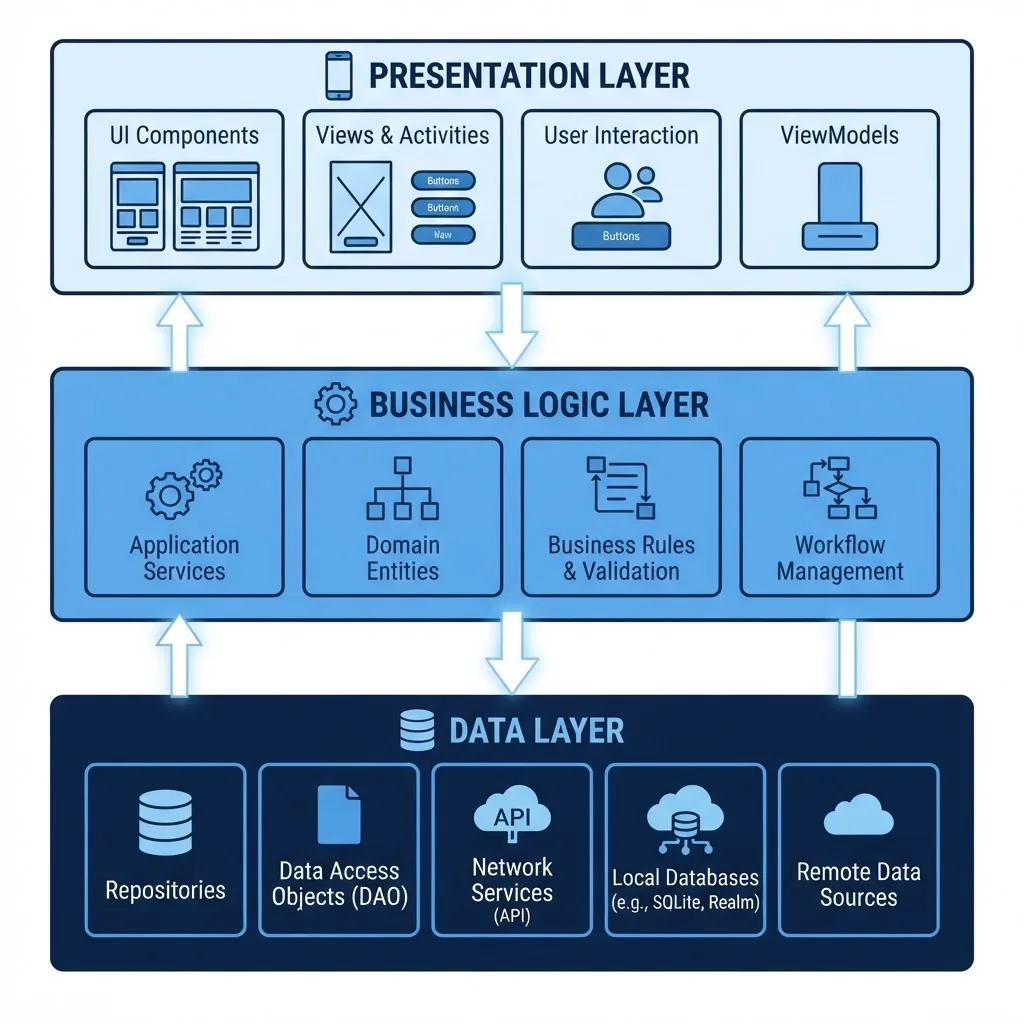
Almost every credible mobile architecture — MVVM, MVI, Clean Architecture, VIPER — is a variation on three layers. Understanding the layers matters more than memorising the acronyms.
1. Presentation Layer
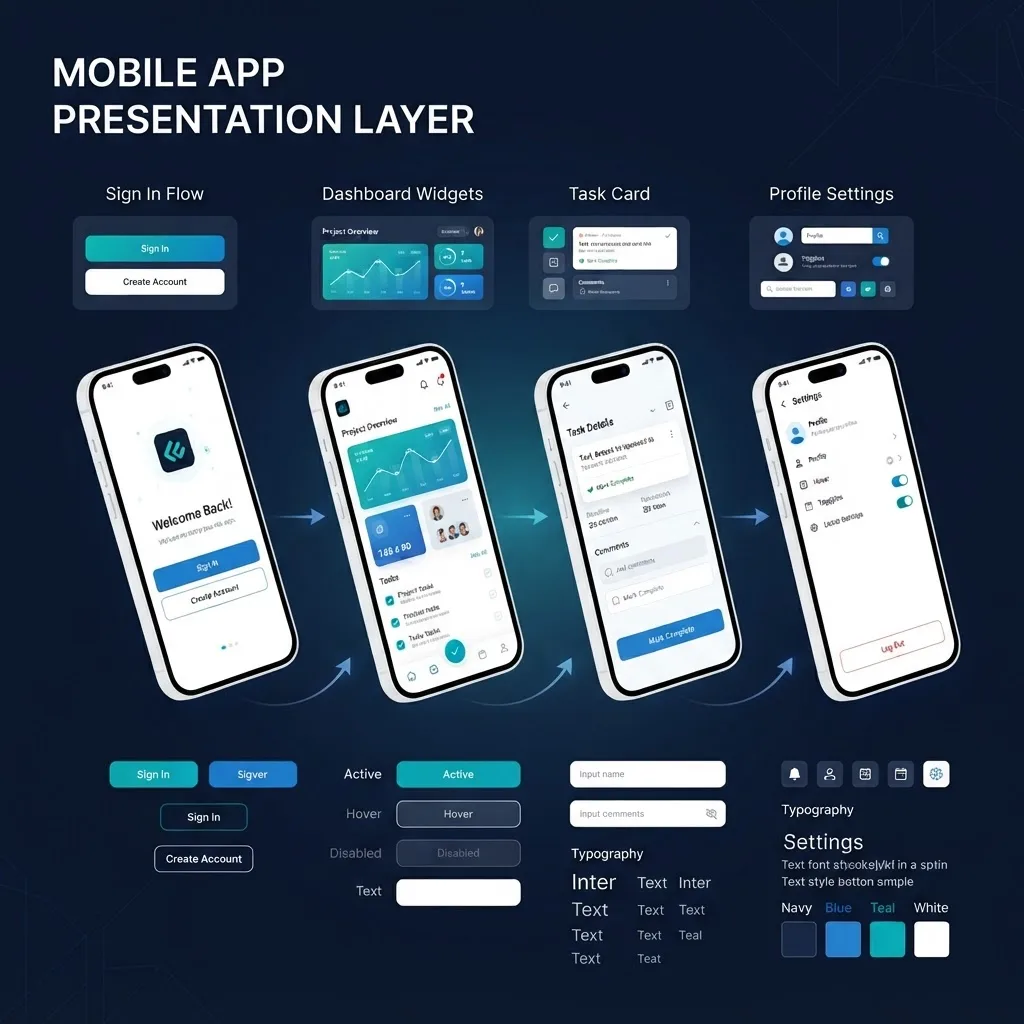
The presentation layer renders state and captures user intent. Nothing else. It contains screens, components, navigation, animation, and view models that expose ready-to-render state.
Rules that pay off in practice:
- Screens never call an API or database directly.
- Every screen models loading, empty, error, and success as explicit states, not booleans scattered across a file.
- Formatting logic (currency, dates, pluralisation) lives in one place, not repeated per screen.
2. Business Logic Layer
This layer holds the rules that would still be true if you replaced the entire UI: pricing calculations, permission checks, validation, retry policies, and feature orchestration. It should contain no imports from UI or networking libraries, which makes it the fastest part of your app to unit test.
A concrete example: "a user may apply one promo code per order, and expired codes must show a specific message" belongs here — not in a button handler.

3. Data Layer
The data layer owns network clients, local databases, caching, and mapping between API models and domain models. Expose it through repositories so the rest of the app asks for "the user's orders" without knowing whether the answer came from SQLite or a REST call.
This is where mobile architecture genuinely differs from web architecture. Phones lose connectivity, get killed by the OS, and change networks mid-request. According to Google's guidance on Android app quality, apps are routinely process-killed in the background, meaning any state you did not persist is state you have lost. Designing an offline-first data layer is therefore a correctness requirement, not a premium feature.

Native, Cross-Platform, or Hybrid: An Architectural Decision
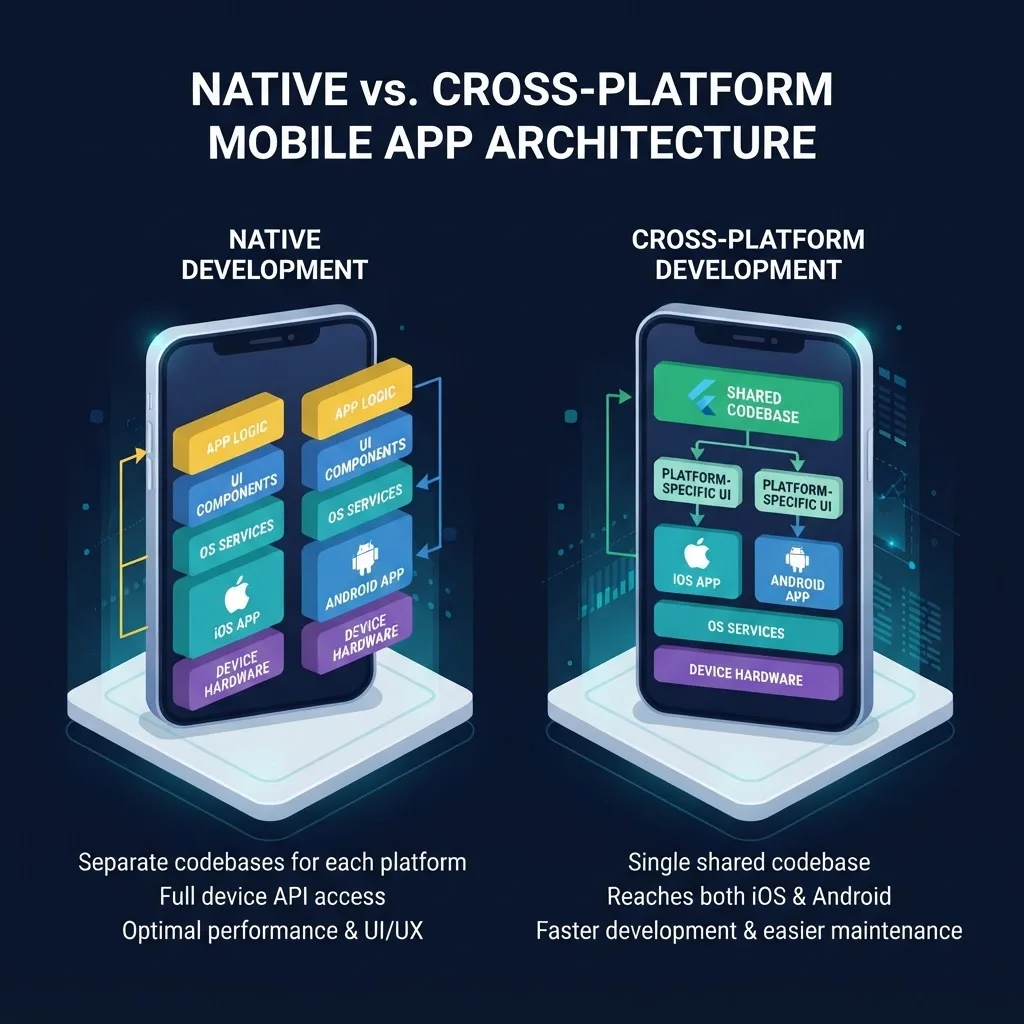
The platform choice constrains your architecture more than any other decision, so make it deliberately. Note that the layer separation above applies in all three cases — only the implementation shifts.
| Approach | Best For | Performance | Code Reuse | Main Architectural Cost |
|---|---|---|---|---|
| Native (Swift / Kotlin) | Camera, AR, background processing, heavy animation | Highest | None across platforms | Two codebases, two sets of patterns to keep aligned |
| Cross-platform (Flutter / React Native) | Feature-parity apps, marketplaces, content and booking apps | High for most UI work | 70 to 90 percent | Native bridges needed for deep platform features |
| Hybrid / web wrapper (PWA in a shell) | Content-heavy apps, internal tools, MVPs | Lowest | Near total with web | Limited offline control and constrained device access |
The honest rule of thumb: choose native when the hardware is the product, choose cross-platform when the workflow is the product, and choose hybrid only when speed of validation outranks experience quality. Teams that need help pressure-testing this decision against a real roadmap often bring in a partner for the discovery phase — that is exactly the kind of scoping work covered by ZoneTechify's mobile app development services.
Choosing an Architectural Pattern
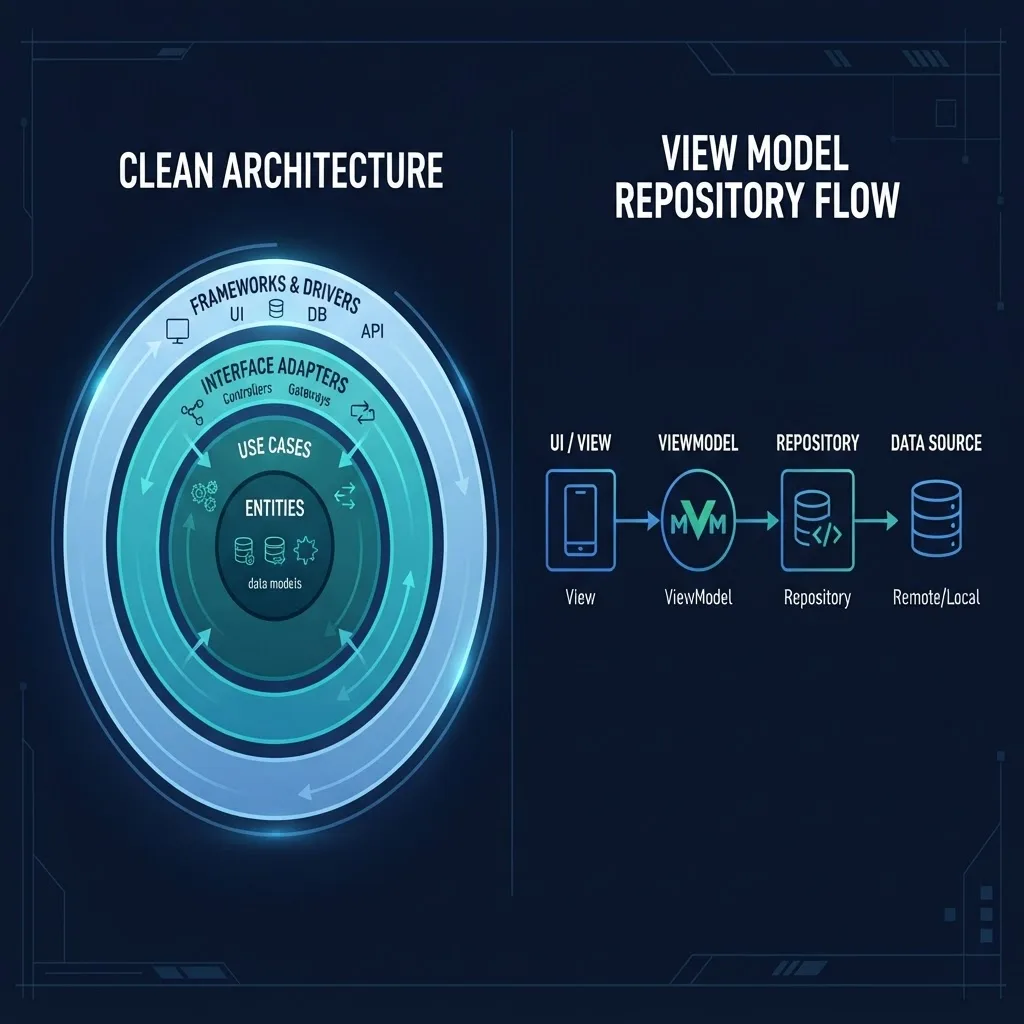
Once layers are defined, a pattern specifies the wiring. These are the four you will actually encounter.
MVVM (Model-View-ViewModel)
The default for Android with Jetpack Compose and a strong fit for SwiftUI. The view observes an immutable state object exposed by a view model, and events flow in one direction. Best for apps with moderate complexity and a small-to-medium team.
MVI / Unidirectional Data Flow
Every user action becomes an intent, reduced into a single new state. Debugging becomes far easier because you can log the exact sequence of state transitions that produced a bug. Best for apps with complex, interdependent screen state such as multi-step checkouts or trading interfaces.
Clean Architecture
Organises code into concentric layers where dependencies point inward toward domain rules. It is the most maintainable option for large apps and the most over-applied option for small ones. If your app has under fifteen screens, full Clean Architecture will add more ceremony than value.
Modularisation
For larger products, split by feature module (auth, catalogue, orders) rather than by technical type. Feature modules enforce boundaries the compiler can check, and they cut build times noticeably — a real productivity gain once a team passes roughly five engineers.
Pattern Selection Shortcut
- Under 10 screens, one or two developers: layered MVVM, single module.
- 10 to 30 screens, small team: MVVM or MVI with repositories and a domain package.
- 30-plus screens, multiple squads: Clean Architecture with feature modules.
Non-Negotiables: Performance, Security, and Observability
Architecture decisions determine whether these are achievable or bolted on badly.

Performance. Google's research on mobile experience found that 53 percent of mobile site visits are abandoned when loading takes longer than three seconds, and user tolerance inside apps is no more forgiving. Architecture supports speed by enabling cache-first reads, paginated lists at the repository level, and lazy-loaded feature modules.
Security. The OWASP Mobile Top 10 consistently ranks insecure data storage and insecure communication among the most common mobile risks. Architecturally, this means one authenticated network client that no feature can bypass, tokens stored only in Keychain or Keystore, secrets kept server-side, and certificate pinning applied in a single place rather than per request.
Observability. Route crash reporting, analytics, and structured logging through one interface in the data layer. When an incident happens, you want to answer "which API call failed and on which app version" without shipping a new build.
Accessibility and platform conventions. Handling dynamic type, screen readers, and dark mode at the component level — inside a shared design system — is dramatically cheaper than retrofitting them screen by screen. Teams building the surrounding marketing site and app store presence alongside the product can keep that visual system consistent with support from WebPeak and ZoneTechify.
A Practical Architecture Checklist
Use this before writing the first screen:
- Define your three layers and write down what is forbidden in each.
- Choose one state management approach and ban all alternatives in code review.
- Decide the offline behaviour of every core screen: cached, queued, or blocked.
- Create a single networking client with auth, retry, and error mapping built in.
- Standardise error handling into typed domain errors, not raw exceptions in the UI.
- Add crash reporting and structured logging before launch, not after the first outage.
- Write unit tests for the business logic layer only — that is where the return is highest.
- Document the folder structure in a README so onboarding does not depend on tribal knowledge.
Common Architecture Mistakes
- API calls inside UI components. The single most expensive shortcut in mobile development, because it makes testing and reuse impossible.
- Treating the API response as your app model. One backend rename then breaks twelve screens. Map at the boundary instead.
- Global mutable singletons for state. They work until two screens disagree about the truth.
- Over-engineering an MVP. Five abstraction layers for a three-screen app slows delivery without reducing risk.
- Ignoring app lifecycle. Backgrounding, rotation, and process death must be designed for, not discovered in production.
Key Takeaways
- Mobile application architecture separates presentation, business logic, and data so each can change independently.
- The business logic layer should have zero UI or networking dependencies, making it the cheapest layer to test.
- Offline-first data design is a correctness requirement on mobile, since the OS can terminate background processes at any time.
- Google reports 53 percent of mobile visits are abandoned after three seconds of load time, so cache-first reads and pagination are architectural concerns.
- OWASP ranks insecure storage and communication among the top mobile risks; centralise auth, token storage, and pinning in one client.
- Match the pattern to scale: MVVM for small apps, MVI for complex state, Clean Architecture with feature modules for large teams.
Frequently Asked Questions (FAQ)
What is the best architecture for a mobile app?
There is no universal best. For most apps, a layered MVVM structure with repositories offers the strongest balance of simplicity and testability. Large multi-team apps benefit from Clean Architecture with feature modules, while apps with complex screen state are better served by MVI and unidirectional data flow.
What are the three layers of mobile app architecture?
The three layers are presentation, business logic, and data. Presentation renders state and captures input, business logic holds rules that survive a UI rewrite, and the data layer manages APIs, local storage, and caching. Dependencies should flow inward, never from data back into the UI.
Should I choose native or cross-platform for my app?
Choose native when hardware features, sustained performance, or advanced animation define the experience. Choose cross-platform such as Flutter or React Native when both platforms need the same features quickly and you want 70 to 90 percent code reuse. The layered architecture remains the same either way.
How do I make my mobile app work offline?
Design the data layer offline-first. Read from a local database as the source of truth, write user actions to a queue, and sync when connectivity returns. Decide per screen whether it should serve cached data, queue the action, or block, then surface sync status clearly in the UI.
How much does architecture affect app performance?
Significantly. Architecture determines whether you can cache, paginate, lazy-load, and move work off the main thread without refactoring. Since Google reports 53 percent of mobile visits are abandoned past three seconds, structural decisions that enable fast first render directly influence retention and conversion.
When should I refactor my app's architecture?
Refactor when symptoms are measurable: small changes break unrelated screens, build times climb steadily, or the same bug reappears in several places. Refactor incrementally by extracting one feature into clean layers, proving the pattern, then migrating the rest — never as a full rewrite.
Final Word
Good mobile architecture is invisible to users and obvious to developers. It shows up as shipping speed six months in, as bugs that stay fixed, and as the ability to onboard a new engineer in a day. Choose the smallest structure that supports your roadmap, enforce it in code review, and expand only when the app's complexity actually demands it.