A practical guide to AI assistant apps in 2026: how they work, what features matter, how to choose one, and what it costs to build your own.
AI Assistant App
An AI assistant app is no longer a novelty voice toy that sets timers and mishears song titles. In 2026, it is the layer where most people actually touch artificial intelligence: drafting replies, summarising a 40-page PDF, rescheduling a meeting, translating a supplier message, or pulling the one number you need out of a spreadsheet. The category has shifted from command-and-response to reasoning-and-acting, and that shift changes how you should evaluate, choose, or build one.
This guide is written from hands-on experience shipping and testing assistant apps for clients at ZoneTechify and WebPeak. It covers what an AI assistant app really is, which features separate a useful one from a wrapper, how the main options compare, what building one costs, and where the privacy risks sit.
Quick Answer: An AI assistant app is a mobile or desktop application that uses large language models to understand natural language and complete tasks — writing, summarising, searching, scheduling, and app automation. The best ones combine multimodal input, memory, tool access, and transparent privacy controls rather than only answering questions.
What Is an AI Assistant App, Exactly?
Definition: An AI assistant app is software that accepts natural language input (typed, spoken, or visual), interprets intent using a large language model, and then either produces content or executes actions through connected tools and APIs.
The important word is executes. A chatbot answers. An assistant acts. That distinction is what separates a 2023-era app from a 2026 one, and it comes down to three technical capabilities:
- Tool calling — the model can invoke functions (calendar, email, search, database) instead of only generating text.
- Memory — the app stores durable context about you, so you do not re-explain your job, tone, or preferences every session.
- Multimodality — it accepts photos, screenshots, documents, and audio, not just text.
If an app lacks all three, it is a chat interface with a logo on it. That is worth knowing before you pay a subscription.
Why AI Assistant Apps Went Mainstream So Fast
Adoption ran ahead of almost every previous consumer software category. According to a 2024 Reuters Institute survey across six countries, ChatGPT had been used at least once by around 23 percent of respondents in the UK and 30 percent in the US — remarkable reach for a product launched in late 2022. Meanwhile Google has reported that Gemini-class assistant features now ship on billions of Android devices, meaning most smartphone owners have an assistant preinstalled whether they sought one out or not.
The second driver is cost collapse. Inference pricing for capable models has fallen dramatically since 2023, which is why assistant apps now offer generous free tiers. When the marginal cost of a helpful answer approaches zero, distribution becomes the whole game — and that is why every major OS vendor is bundling one.
The practical consequence for users: you rarely need to pay for a general assistant. You pay for specialisation, privacy guarantees, or integration depth.
The Features That Actually Matter
After testing assistants against real client workflows — inbox triage, proposal drafting, research summarising — these are the features that changed measurable outcomes, in rough order of impact.
1. Persistent, Editable Memory
An assistant that remembers your company name, writing style, and recurring clients removes the biggest hidden cost of AI: re-prompting. Insist on memory you can view and delete. Memory you cannot audit is a liability, not a feature.
2. Document and Screen Understanding
Upload a contract, get the renewal clause. Screenshot an error, get the fix. This is where multimodal models earn their keep, and it is the single most common request we see from non-technical teams.
3. Real Integrations, Not Copy-Paste
A calendar integration that creates the event beats one that tells you what to type. Check whether the app connects to the tools you already use — Gmail, Slack, Notion, Drive, your CRM.
4. Voice That Handles Interruption
Modern speech-to-speech models allow you to interrupt mid-sentence and change direction. If an app still requires you to wait for a full response, its voice mode will feel a generation old.

5. Transparent Sourcing
Any factual claim should link to a source you can open. Assistants that cite are usable for work; assistants that assert are only usable for drafts.
AI Assistant App Comparison: General vs Native vs Custom
Most buying decisions fall into three buckets. This table reflects how they behave in practice, not marketing claims.
| Factor | General Assistant App (ChatGPT, Claude, Gemini) | Native OS Assistant (Siri, Android system AI) | Custom-Built Assistant |
|---|---|---|---|
| Setup effort | Minutes | Already installed | Weeks of development |
| Reasoning quality | Highest | Moderate to high | Depends on chosen model |
| Device-level control (calls, settings) | No | Yes | Limited |
| Access to your private business data | Only what you upload | No | Yes, by design |
| Data residency control | Vendor-defined | Vendor-defined | Full control |
| Ongoing cost | Free to about 20 USD per month | Included | Hosting plus token usage |
| Best for | Individual knowledge work | Hands-free phone tasks | Internal company workflows |
The honest recommendation: use a general assistant for personal productivity, rely on the native one for hands-free device control, and only build custom when your value depends on private data the public models cannot see.
How to Choose an AI Assistant App in Five Steps
- Write down your three most repeated tasks this week. Not hypothetical ones — actual ones.
- Test each candidate on those exact three tasks using the free tier. Ten minutes each is enough.
- Check integration coverage for the tools where your work already lives.
- Read the data policy for training use. Look for a clear switch to exclude your inputs from model training.
- Commit for one month, then re-evaluate. Model capability moves fast enough that annual contracts rarely pay off.
This process beats reading feature lists because assistant quality is task-specific. An app that writes excellent marketing copy may be mediocre at extracting figures from invoices.
Building Your Own AI Assistant App: The Realistic Architecture
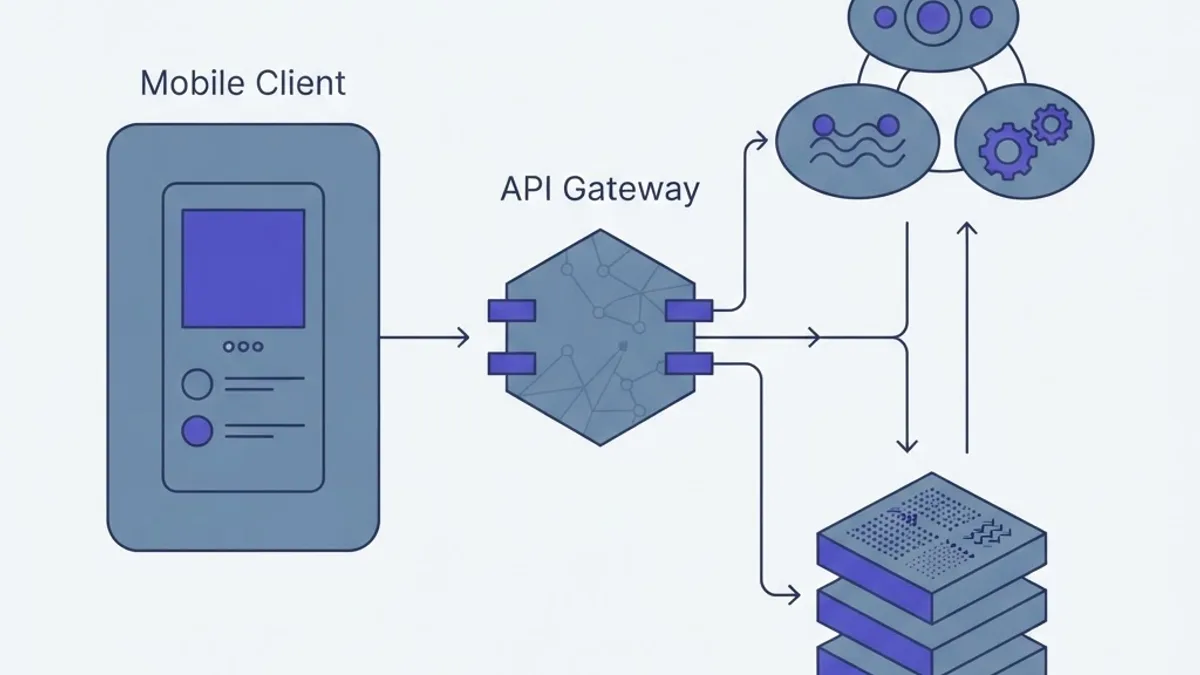
If you decide to build, the architecture has stabilised into a well-understood pattern. Teams that follow it ship faster than teams inventing structure from scratch.
- Client layer — React Native, Flutter, or a Next.js progressive web app. A PWA is the fastest route to validating demand without app-store review cycles.
- Orchestration layer — a server that manages prompts, tool definitions, streaming, and rate limits. Never call model providers directly from the client; that exposes keys and removes your ability to control spend.
- Model layer — route through a gateway so you can switch or fall back between providers without redeploying.
- Retrieval layer — a vector store plus your source-of-truth database, so the assistant answers from your documents rather than guessing.
- Tool layer — narrow, well-described functions. Ten precise tools outperform one vague tool with fifteen parameters.
Cost Expectations
A credible internal assistant MVP — authentication, chat, document upload, retrieval, two or three integrations — typically lands in the low tens of thousands of dollars for a competent team, with running costs dominated by token usage rather than hosting. The mistake we see most often is overspending on a polished interface before validating that the assistant answers the ten questions employees actually ask. Build the retrieval quality first; the UI is comparatively cheap.
For teams that want this scoped and delivered rather than researched, our artificial intelligence services cover architecture, model selection, and deployment. Readers evaluating packaged versus custom approaches may also find our breakdown of artificial intelligence mod APK risks useful before installing unofficial assistant builds.
Privacy and Security: The Part Most Reviews Skip
An assistant app is, by definition, a system you feed your most sensitive context into. Treat it like any other data processor.
- Check training defaults. Consumer tiers often train on your inputs unless you opt out; business tiers usually do not. Verify rather than assume.
- Avoid unofficial or cracked builds. Modified assistant APKs distributed outside official stores are a known vector for credential theft, because the app legitimately requests broad permissions.
- Scope integration permissions narrowly. An assistant that needs to read your calendar does not need permission to delete your mailbox.
- Keep regulated data out of general assistants. Health, financial, and legal records belong in a deployment where you control residency and retention.

Getting Real Productivity Out of It
The teams that gain the most from assistant apps do one unglamorous thing: they standardise prompts. Instead of every employee improvising, they save a small library of reusable instructions for the tasks the business repeats — meeting notes to action items, support ticket to draft reply, spec to test checklist.
Two habits compound the benefit:
- Always give the assistant the source material. Answers grounded in your own document are dramatically more accurate than answers pulled from model memory.
- Ask for structure. Requesting a table, checklist, or numbered plan produces output you can act on immediately instead of prose you must reformat.

Where AI Assistant Apps Are Heading
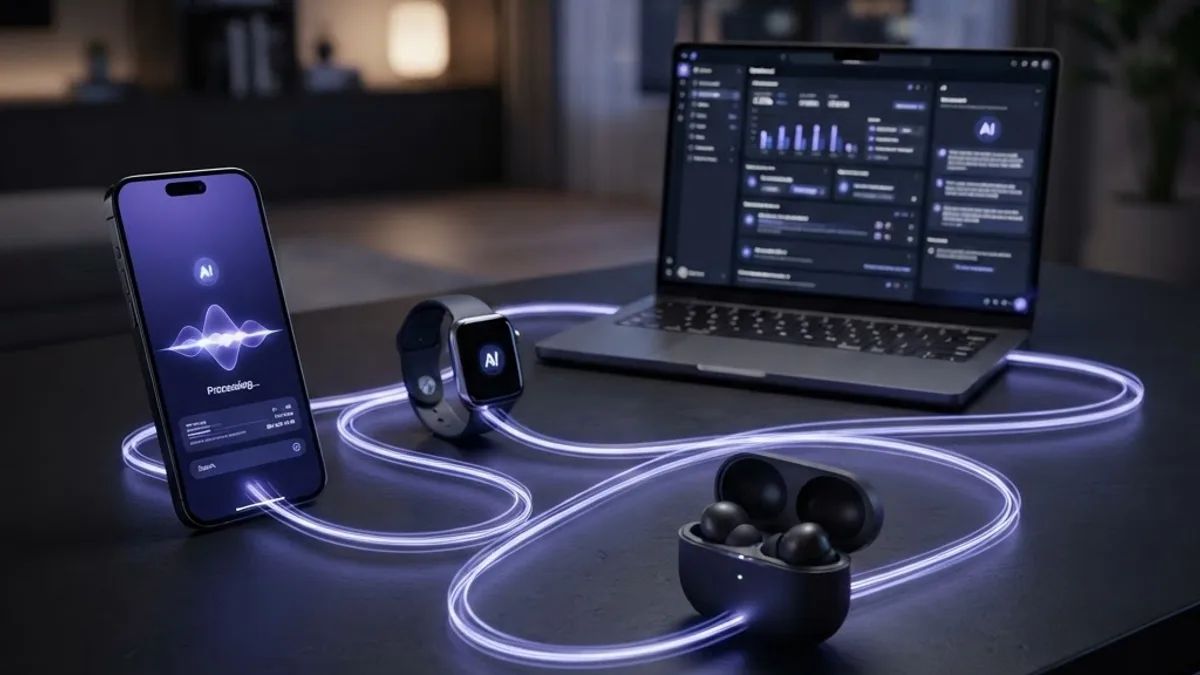
Three changes are already visible in shipping products. First, assistants are moving from single replies to multi-step agents that plan, act, and verify — which makes reliability, not eloquence, the competitive axis. Second, on-device models are handling routine requests locally, cutting latency and keeping more data off servers. Third, assistants are becoming ambient across earbuds, watches, and laptops with shared context, so the conversation follows you between devices.
Key Takeaways
- An AI assistant app is defined by its ability to act through tools, not just answer questions.
- The three capabilities that matter most are tool calling, auditable memory, and multimodal input.
- Reuters Institute research found roughly 30 percent of US respondents had used ChatGPT by 2024, and Google has stated Gemini-class assistant features reach billions of Android devices.
- Use a general assistant for knowledge work, the native OS assistant for hands-free device control, and custom builds only when private business data is the differentiator.
- Validate any assistant against your three most repeated tasks before subscribing.
- Never install unofficial or modified assistant builds — permission scope makes them unusually dangerous.
- Build retrieval quality before interface polish when developing your own.
Frequently Asked Questions (FAQ)
What is the best AI assistant app right now?
There is no single winner. ChatGPT leads on general reasoning and integrations, Claude on long-document work and writing quality, and Gemini on Android and Google Workspace tasks. Test all three on your own repeated tasks for ten minutes each — task fit matters more than benchmark scores.
Are AI assistant apps free to use?
Most offer capable free tiers with daily usage limits and access to slightly older models. Paid plans generally cost around 20 US dollars per month and add higher limits, faster responses, better voice modes, and file handling. Free tiers are sufficient for casual personal use.
Is it safe to give an AI assistant app access to my email?
It can be, if you use an official app from a major vendor, grant the narrowest permission scope offered, and confirm your data is excluded from model training. Avoid connecting mailboxes containing regulated client, medical, or financial records to a consumer-tier assistant.
How much does it cost to build a custom AI assistant app?
A functional internal MVP with chat, document retrieval, and a few integrations typically starts in the low tens of thousands of dollars. Ongoing costs are driven mainly by token usage rather than hosting. Costs rise with compliance requirements, offline support, and deep enterprise system integration.
Can an AI assistant app work without an internet connection?
Partially. Newer phones run small on-device models that handle summarising, transcription, and simple commands offline. Complex reasoning, web search, and long-document analysis still require a cloud connection, so most assistants degrade to a limited feature set when offline.
Will AI assistant apps replace human assistants?
No. They reliably absorb repetitive drafting, summarising, and scheduling work, but they lack accountability, relationship judgement, and the ability to make decisions on someone's behalf. In practice they shift human assistants toward higher-value coordination rather than eliminating the role.